Akamai BMP SDK in Flutter: Bot Protection Integration Guide
Akamai BMP SDK in Flutter: X-acf-sensor-data headers, 428 challenge handling, 403 blocks, and the Dio interceptor chain — from a production e-commerce app.
For CTOs, tech leads, and senior developers building enterprise mobile apps behind Akamai infrastructure — or planning to.
TL;DR: Akamai sits between your mobile app and your backend - providing CDN, image optimization, and bot protection. The problem: bot detection was designed for browsers, and your native app looks like a bot. Akamai provides a BMP (Bot Manager Premier) SDK for Flutter that collects behavioral sensor data and sends it via HTTP headers. But the SDK gives you the primitives - the orchestration is on you. I spent months integrating the BMP SDK into a Flutter e-commerce app for a Swiss electronics retailer: building a Dio interceptor chain for sensor data injection, handling two tiers of bot responses (428 challenges and 403 blocks), and configuring path-based URL filtering with remote config.
The Setup: Akamai Everywhere
The client is a Swiss electronics retailer. Their infrastructure runs through Akamai - CDN for static assets, Image Manager for responsive image delivery, and Akamai Bot Manager for bot detection and mitigation. Every request from every client passes through Akamai before it reaches the backend.
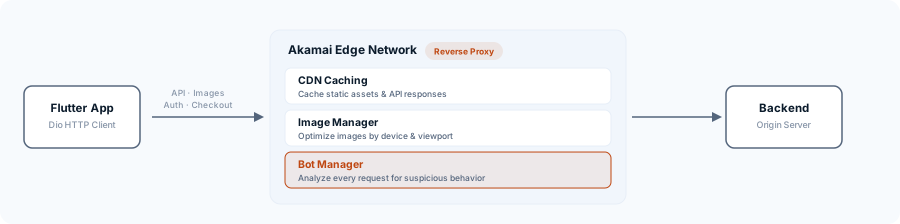
For their website, this is invisible. The browser handles cookies, executes JavaScript challenges, and maintains session state. Akamai was built for this exact scenario.
For a native Flutter app making HTTP requests with Dio? Different story.
I worked on this project for about ten months, building the app from the ground up. The Akamai integration touched the networking layer, image loading, authentication flow, and checkout. This post covers the four main integration surfaces: Image Manager, the BMP SDK, the interceptor chain, and challenge handling.
Image Manager: Optimized Images from the CDN Edge
Akamai Image Manager transforms images on the CDN edge. You pass parameters as URL query strings, and Akamai returns an optimized image - resized, compressed, format-converted. No image processing server needed.
For CMS content images served through a dedicated asset host, the integration is a string extension that builds the optimized URL:
extension on String {
  String? get toOptimizedContentUrl {
    return Uri.https('assets.example.ch', this, {
      'imdensity': '2',
      'impolicy': 'contentstack',
      'imwidth': '480',
    }).toString();
  }
}
The impolicy parameter selects a transformation preset configured in Akamai’s control panel. imwidth sets the target width, and imdensity accounts for high-DPI screens. The CDN caches each variant at the edge, so the second request for the same parameters is instant.
This extension gets applied wherever the app renders CMS-managed content - home feed items, banners, product badges, search suggestions. One centralized transformation, used in over a dozen places across the app.
This was the straightforward part of the Akamai integration. Everything after this required more architecture.
Why the App Got Blocked
Launch was approaching, and with it a deliberate decision: the Akamai rules were tightened. The app needed protection against DDoS attacks and automated abuse. Clients now had to actively prove they weren’t bots.
For the web shop, this was a non-issue. Browser traffic brings everything Akamai Bot Manager needs: the _abck session cookie from previous interactions, a recognizable User-Agent like Mozilla/5.0, and the ability to execute Akamai’s sensor script — a JavaScript that inventories canvas rendering, WebGL hashes, installed fonts, and dozens of other signals to distinguish real browsers from automation.
A native app on its first API request has none of those signals. No _abck cookie. No behavioral fingerprint. No JavaScript context. And a User-Agent that says something like Dio/5.0 — Dart’s HTTP client — instead of Mozilla/5.0. Akamai scores every request with a Bot Score from 0 (human) to 100 (bot). A standard HTTP client without sensor data scores near 100 — maximum bot confidence.
The result: 403 Forbidden. But not everywhere at once. Bot Manager allows transactional endpoints to be configured individually — login, checkout, and account pages can be protected with stricter thresholds than product listings or search endpoints. In practice: product images load, but login fails. Or the cart works, but checkout doesn’t. Not consistently reproducible, because the Bot Score is dynamic — the same request can be evaluated differently depending on IP reputation, TLS fingerprint, and time of day.
The BMP SDK: Proving You’re Not a Bot
Akamai provides a Bot Manager Premier (BMP) SDK for Flutter - a native plugin that collects behavioral sensor data on the device. Touch events, device motion, screen interactions - the SDK builds a fingerprint that Akamai’s edge servers can evaluate to distinguish human users from bots.
The SDK ships as a platform plugin wrapping native libraries (an AAR for Android, an xcframework for iOS). Integration starts in pubspec.yaml:
dependencies:
  bmp_flutter_sdk:
    path: packages/bmp_flutter_sdk
Initialization happens at app startup. You pass the base URL of the protected resource, and optionally enable the challenge action feature:
void _initializeAkamaiSdk(ShopConfig config) {
  AkamaiBMP.configureSDK(baseUrl: config.baseUrl);
  AkamaiBMP.configureChallengeAction(baseUrl: config.baseUrl);
}
Once initialized, the SDK silently collects behavioral data in the background. When you need to make a protected API call, you retrieve the sensor data and send it as an HTTP header:
final sensorData = await AkamaiBMP.getSensorData();
headers['X-acf-sensor-data'] = sensorData;
Akamai’s edge server inspects this header, evaluates the sensor data, and decides whether the request looks human. If it does, the request passes through to the origin. If it doesn’t, the server responds with either a 428 (challenge) or a 403 (block).
The SDK handles the hard part - native sensor data collection across platforms. But the orchestration - deciding which requests need sensor data, handling challenge responses, retrying failed requests - that’s your job.
The Interceptor Chain
The real architecture work is the Dio interceptor chain — the same pattern I use for token refresh and silent logout. Four interceptors, each with a single responsibility, executed in order on every request:
1. Sensor Data Enrichment
The first interceptor checks if the outgoing request targets an Akamai-protected URL. If it does, it retrieves sensor data from the BMP SDK and injects it as the X-acf-sensor-data header:
class AkamaiSensorDataEnrichmentInterceptor extends Interceptor {
final List<AkamaiProtectedUrlRule> akamaiProtectedUrlRules;
Future<void> onRequest(
RequestOptions options,
RequestInterceptorHandler handler,
) async {
if (!akamaiProtectedUrlRules.matchUri(options.uri)) {
handler.next(options);
return;
}
final sensorData = await AkamaiBMP.getSensorData() ?? '';
if (sensorData.isNotEmpty) {
options.headers['X-acf-sensor-data'] = sensorData;
}
handler.next(options);
}
}2. Challenge Action (HTTP 428)
If Akamai isn’t sure whether the request is from a human, it returns HTTP 428 (Precondition Required) with an Akamai-BM-Challenge-Context header. The interceptor catches this, presents a native challenge dialog to the user via the SDK, and retries on success:
class AkamaiChallengeActionInterceptor extends Interceptor {
final Dio _dio;
final List<AkamaiProtectedUrlRule> _akamaiProtectedUrlRules;
Future<void> onError(
DioException err,
ErrorInterceptorHandler handler,
) async {
final response = err.response;
if (response == null ||
response.statusCode != 428 ||
!_akamaiProtectedUrlRules.matchUri(response.requestOptions.uri)) {
handler.next(err);
return;
}
final challengeContext =
response.headers.value('Akamai-BM-Challenge-Context');
if (challengeContext != null) {
final ccaResponse = await AkamaiBMP.showChallengeAction(
context: challengeContext,
title: 'Verification Required',
message: 'Please wait while we verify your request.',
cancelButtonTitle: 'Cancel',
);
final status = ccaResponse?['status']?.toString();
if (status == '1') {
// Challenge passed - retry with fresh sensor data
final sensorData = await AkamaiBMP.getSensorData() ?? '';
final retryOptions = err.requestOptions.copyWith(
headers: {
...err.requestOptions.headers,
'X-acf-sensor-data': sensorData,
},
);
final retryResponse = await _dio.fetch<dynamic>(retryOptions);
return handler.resolve(retryResponse);
}
}
handler.next(err);
}
}The challenge dialog is native - the SDK renders it, not a WebView. The user sees a brief verification screen, and on success the request retries transparently.
3. Bot Protection (HTTP 403)
If Akamai is confident the request is from a bot, it returns HTTP 403 with a reference_id in the response body. Unlike the 428 challenge, this is terminal - there’s no way to solve it programmatically. The interceptor shows a support dialog with the reference ID so the user can contact support:
class BotProtectionInterceptor extends Interceptor {
final List<AkamaiProtectedUrlRule> akamaiProtectedUrlRules;
void onError(DioException error, ErrorInterceptorHandler handler) {
final referenceId = switch (error.response?.data) {
final Map<String, dynamic> data
when data.containsKey('reference_id') =>
data['reference_id'] as String?,
_ => null,
};
if (error.response?.statusCode == 403 &&
referenceId != null &&
akamaiProtectedUrlRules.matchUri(error.requestOptions.uri)) {
// Show bot detection dialog with reference ID and support contact
_showBotDetectionDialog(referenceId);
}
handler.next(error);
}
}The distinction between 428 and 403 matters. A 428 is a question: “Are you human? Prove it.” A 403 with a reference ID is a verdict: “We’re blocking you.” Different responses, different UX flows.
4. Session Cookie Monitoring
A fourth interceptor monitors the application’s session cookie on authenticated requests and logs to crash reporting when it’s missing. This isn’t Akamai-specific - it catches cases where the session state got corrupted, regardless of cause.
URL-Based Filtering
Not every request needs Akamai protection. Product listings, image URLs, static content - these don’t need sensor data. Only high-value endpoints like authentication and checkout warrant the overhead.
The filtering uses path-based rules with three match types:
class AkamaiProtectedUrlRule {
  final RuleType type; // pathEquals, pathContains, pathRegex
  final String rule;

  bool matches(Uri uri) {
    switch (type) {
      case RuleType.pathEquals:
        return uri.path == rule;
      case RuleType.pathContains:
        return uri.path.contains(rule);
      case RuleType.pathRegex:
        return RegExp(rule).hasMatch(uri.path);
    }
  }
}
The protected endpoints in this project:
/api/accounts/authenticate/api/accounts/registration/api/accounts/changeemail/api/accounts/forgotpassword/api/accounts/resetpassword/api/checkout/init/api/checkout/validate/api/checkout/order
These rules are defined as fallback defaults but can be overridden via Firebase Remote Config. When the security team adjusts which endpoints are protected, the app picks up the change without a release.
Why does this matter? Two reasons. First, getSensorData() has a cost - it’s an async call that adds latency. Calling it on every request to every endpoint is wasteful. Second, the SDK docs explicitly say: “Don’t call the getSensorData method for non-protected URLs.” You’re collecting behavioral data, and sending it unnecessarily is both a performance and a privacy concern.
Testing and Debug Tooling
You can’t run Akamai’s bot detection locally. The evaluation happens on Akamai’s edge servers, not on your machine. But you can test the interceptor logic and verify the SDK integration.
The BMP SDK includes built-in integration checks. The app exposes these on a debug page:
// Run integration diagnostics
AkamaiBMP.runIntegrationChecks();
AkamaiBMP.runIntegrationChecksWithCCAEnabled();
These verify that the SDK initialized correctly, sensor data collection works, device motion sensors are accessible, and the challenge action feature is configured. The SDK logs results to the console with a clear pass/fail for each check.
For the interceptor chain, mock interceptors in CI test the retry logic and URL filtering independently of Akamai’s edge servers:
test('enriches protected URL with sensor data header', () async {
  final interceptor = AkamaiSensorDataEnrichmentInterceptor(
    akamaiProtectedUrlRules: [
      AkamaiProtectedUrlRule(
        type: RuleType.pathContains,
        rule: '/api/checkout/order',
      ),
    ],
  );

  final options = RequestOptions(path: '/api/checkout/order');
  final handler = MockRequestInterceptorHandler();
  await interceptor.onRequest(options, handler);

  expect(options.headers['X-acf-sensor-data'], isNotNull);
});
A staging environment with Akamai enabled remains the only way to verify the full flow end-to-end. Local development uses mock interceptors, but every change to the networking layer gets tested against staging before merge.
What I Learned
A few things that aren’t obvious from the SDK documentation:
The challenge action response has three states, not two. Status 1 means success, 0 means the user canceled, and -1 means the challenge failed. Handle all three explicitly - cancellation and failure need different error messages.
Sensor data should be fresh for retries. After a successful challenge action, don’t reuse the sensor data from the failed request. Call getSensorData() again to get fresh behavioral data. The edge server expects sensor data that reflects the current session state.
The SDK needs initialization before the first API call. Call configureSDK() early in the app lifecycle - before any protected API request fires. If the SDK hasn’t collected enough behavioral data when the first request goes out, the sensor payload will be thin, and Akamai is more likely to challenge.
URL rule changes require no app release. Making the protected URL rules configurable via remote config was one of the better architectural decisions. When the security team added new protected endpoints mid-sprint, we updated the rules without a release cycle.
Conclusion
Akamai’s BMP SDK handles the hard part - native behavioral sensor data collection across iOS and Android. The challenge is everything around it: building the interceptor chain, handling the two-tier response system, configuring URL-based filtering, and building the debug tooling to verify it all works.
The interceptor chain - sensor data enrichment, challenge action handling, bot protection, session monitoring - is compact. Each interceptor has a single responsibility, and the URL rule system ensures they only fire for endpoints that need protection.
Three takeaways from this project:
Plan the Akamai integration from the start. If you know your backend sits behind Akamai, begin with the SDK integration and the interceptor chain - not when the 403 errors start arriving.
Keep the URL rules updatable. Remote config for the protected endpoints isn’t an optimization - it’s an operational necessity when the security team needs to adjust rules independently of the app release cycle.
The SDK integration itself takes days. The interceptor architecture, URL filtering, remote config, debug tooling, and testing against staging - that’s where the real time goes.
I’ve built this integration end-to-end for a production e-commerce app. If your team is planning a similar integration, let’s talk.
Frequently Asked Questions
What is Akamai Bot Manager and how does it affect mobile apps?
Akamai Bot Manager is a bot detection and mitigation service that sits between clients and origin servers. It evaluates incoming requests using behavioral analysis and device fingerprinting. Mobile apps need the BMP SDK to provide sensor data via the X-acf-sensor-data HTTP header, which Akamai’s edge servers evaluate to distinguish legitimate app traffic from bots.
Does Akamai provide a mobile SDK for bot protection?
Yes. Akamai provides a Bot Manager Premier (BMP) SDK for Flutter, iOS, and Android. The Flutter SDK (bmp_flutter_sdk) wraps native platform libraries and provides methods for initialization (configureSDK), sensor data collection (getSensorData), and challenge handling (showChallengeAction). You integrate it as a local Flutter plugin package.
What’s the difference between a 428 and a 403 from Akamai?
A 428 (Precondition Required) means Akamai wants additional verification. The response includes an Akamai-BM-Challenge-Context header, and the app can present a challenge dialog via the SDK. If the user passes, the request can be retried with fresh sensor data. A 403 (Forbidden) with a reference_id means Akamai has classified the request as a bot - this is terminal and can’t be solved programmatically.
Does Akamai Image Manager work with Flutter’s image caching?
Yes. Image Manager URLs are deterministic - the same parameters produce the same optimized image. Flutter’s image cache (via cached_network_image or similar packages) works normally. The CDN also caches each image variant at the edge, so the combination of client-side and edge caching provides good performance.
How do you test Akamai integration in CI/CD?
The BMP SDK includes integration checks (runIntegrationChecks()) that verify SDK initialization and sensor data collection on-device. For CI, mock the interceptor chain to test URL filtering and retry logic without Akamai’s edge servers. A staging environment with Akamai enabled is necessary for end-to-end verification.
What is the X-acf-sensor-data header?
X-acf-sensor-data is the HTTP request header the Akamai BMP SDK uses to transmit behavioral sensor data — touch events, device motion, device signals — from a mobile app to Akamai’s edge servers, which evaluate it to score the request as human or bot. Only send it on protected endpoints: the SDK docs explicitly advise against calling getSensorData() for non-protected URLs, for both performance and privacy reasons.
Is there a bot detection SDK for iOS and Android?
Yes. Akamai’s Bot Manager Premier SDK ships native libraries for iOS (xcframework) and Android (AAR), with wrappers for cross-platform frameworks like Flutter. Other vendors such as DataDome and HUMAN Security offer comparable mobile bot detection SDKs. The integration pattern is similar across vendors: collect behavioral sensor data on-device, attach it to protected requests as a header, and handle challenge and block responses in your networking layer.