One trackEvent(), Four SDKs: Analytics Layer for Flutter
One tracking call reaches Firebase, Klaviyo, and Google Ads via an AnalyticsDispatcher with per-provider adapters, consent gating, and error isolation.
For CTOs, tech leads, and senior developers managing analytics across multiple providers in a production mobile app — or about to add Klaviyo to an existing Firebase setup.
Klaviyo × Flutter series (part 2 of 4): planning & scope · the analytics layer · push notification pitfalls · profiles & newsletter.
TL;DR: Before adding Klaviyo to a Flutter e-commerce app, I built a unified analytics layer — an AnalyticsDispatcher that fans one trackEvent() call to every registered provider through per-provider adapters. The dispatcher handles consent gating and error isolation so one SDK crashing never blocks the others. Google Ads was added after Klaviyo with zero changes to any call site — the pattern paid for itself immediately.
The starting point: 10 call sites, 2 SDKs, no abstraction
The app — a Flutter e-commerce app for a Shopify-based DTC jewelry brand — had grown its analytics organically. About 10 screens and controllers tracked events. Each one imported FirebaseAnalytics directly, built a parameter map, and called logEvent(). A second SDK — an attribution service — was wired in alongside it in some of those same call sites.
No interface. No shared contract. Every call site had to know which SDKs existed and how to talk to each one.
That worked with two providers and low churn. The moment the client asked for a Klaviyo integration, the math changed. Adding Klaviyo to the existing model meant visiting every one of those ~10 call sites, adding a third direct call, and tripling the consent-checking surface. The next provider after that — Meta was already in the estimate — would do it again.
Rough count before the refactoring: ~10 call sites, ~15 integration points (some files called both SDKs, some only Firebase), 0 shared abstractions. After: ~10 call sites, 1 integration point each, and a dispatcher that handles the fan-out.
The analytics layer was the largest single work package of the entire Klaviyo project. It had to ship and stabilize before the Klaviyo adapter could plug in.
The design: Adapter + Mediator
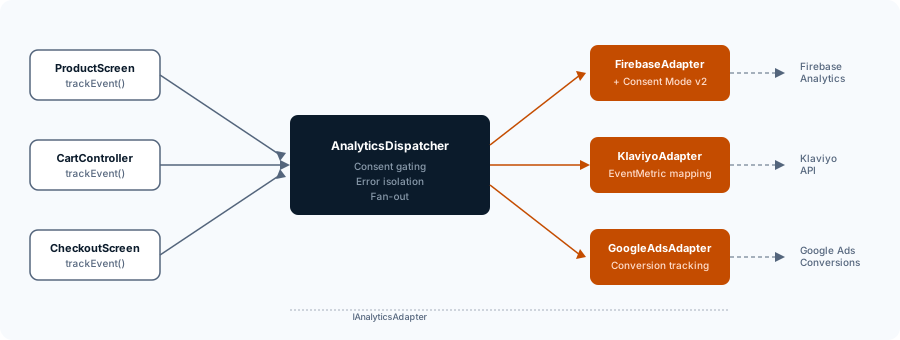
The architecture has two moving parts: an interface that every provider implements, and a dispatcher that iterates over all registered providers.
The adapter interface
Every analytics SDK — Firebase, Klaviyo, Google Ads, and a Meta stub — implements IAnalyticsAdapter:
enum AnalyticsProviderId {
  firebase('firebase_template_id'),
  klaviyo('klaviyo_template_id'),
  googleAds('google_ads_template_id');

  const AnalyticsProviderId(this.templateId);
  final String templateId;
}

typedef ConsentResolver = bool Function(String templateId);

abstract class IAnalyticsAdapter {
  AnalyticsProviderId get providerId;

  Future<void> trackEvent({
    required String eventName,
    Map<String, Object?>? parameters,
  });
  Future<void> trackScreenView({
    required String screenName,
    String? screenClass,
  });
  Future<void> setUserProperty({
    required String name,
    required String value,
  });
  Future<void> setUserId(String? userId);
  Future<void> setEnabled(bool enabled);

  Future<void> applyConsent(ConsentResolver hasConsent) {
    return setEnabled(hasConsent(providerId.templateId));
  }
}
The templateId on each enum value is the key used by the consent management platform (Usercentrics in this project) to identify each data processor. More on that in the consent section below.
The applyConsent method has a default implementation: it resolves the provider’s own template ID against the consent resolver and calls setEnabled. Providers that need deeper consent integration — Firebase with Google Consent Mode v2, for example — override this method.
The dispatcher
The AnalyticsDispatcher receives events through a single API and fans them out:
class AnalyticsDispatcher {
  final List<IAnalyticsAdapter> _providers;
  final ConsentResolver _hasConsent;

  Future<void> trackEvent({
    required String eventName,
    Map<String, Object?>? parameters,
  }) async {
    await _checkConsentAndDispatch(
      (provider) => provider.trackEvent(
        eventName: eventName,
        parameters: parameters,
      ),
      debugLabel: 'trackEvent($eventName)',
    );
  }

  Future<void> _checkConsentAndDispatch(
    Future<void> Function(IAnalyticsAdapter provider) action, {
    String? debugLabel,
  }) async {
    for (final provider in _providers) {
      final name = provider.providerId.templateId;
      final hasConsent = _hasConsent(name);
      if (!hasConsent) continue;
      try {
        await action(provider);
      } catch (e) {
        developer.log(
          'Error in $debugLabel on $name: $e',
          name: 'AnalyticsDispatcher',
          error: e,
        );
      }
    }
  }
}
Three things happen in _checkConsentAndDispatch:
- Consent gating. Each provider’s template ID is checked against the user’s consent state. No consent, no call. The provider never even sees the event.
- Error isolation. Each provider call is wrapped in its own try/catch. If Klaviyo’s SDK throws, Firebase and Google Ads still receive the event. Failures are logged but never propagated.
- Debug labeling. The
debugLabelparameter produces readable log messages likeError in trackEvent(view_item) on klaviyo_template_id: ...— which makes production debugging viable without a debugger attached.
Every call site in the app now depends on a single type: the dispatcher. Screens and controllers call dispatcher.trackEvent(...) and never import a provider SDK directly. The Firebase Analytics integration, the Klaviyo adapter, attribution — all invisible to the calling code. That single interface also means every call site can be tested with one mock dispatcher that asserts on event names and parameters — no per-provider mocking, no coupling to SDK internals.
Patterns rejected on purpose
The Adapter + Mediator combination was not the first option on the whiteboard.
Observer pattern. The textbook choice for “one event, many listeners.” But Observer assumes listeners subscribe and unsubscribe dynamically at runtime. Analytics providers don’t do that — they’re registered at app startup and stay fixed. The subscription mechanism would be dead weight, and the untyped event payloads would lose the structured contract the adapter interface provides.
Strategy pattern. Strategy selects one behavior from many at runtime. The analytics layer needs the opposite: every registered provider receives every event. Strategy’s one-of-N semantics are wrong for a fan-out-to-all scenario.
Plain callback list. A List<Function> that the dispatcher iterates over. Lightweight, but it can’t carry consent state, initialization logic, or typed methods like setUserProperty and trackScreenView. The moment you need more than fire-and-forget event dispatch, callbacks force you to rebuild the interface anyway.
The Adapter + Mediator design costs one class per provider instead of a closure. In exchange: typed method contracts, per-provider consent and lifecycle management, and the ability to add provider-specific methods (like Klaviyo’s setProfile) without leaking them into the dispatcher interface.
GA4 names as the canonical event language
The dispatcher needs a naming convention for events. Every provider speaks a different dialect — Firebase expects view_item, Klaviyo expects Viewed Product, Google Ads maps to conversion IDs. Someone has to pick the canonical format.
GA4 event names were the right choice for us. They are the de-facto industry standard for e-commerce events, Firebase consumes them natively without any mapping, and every other provider can map from them internally.
How events map across providers
| GA4 Event | Firebase | Klaviyo Adapter |
|---|---|---|
app_open | app_open (custom event) | EventMetric.openedApp |
view_item | view_item (GA4 native) | EventMetric.viewedProduct (with value) |
add_to_cart | add_to_cart (GA4 native) | EventMetric.addedToCart (with value) |
search | search (GA4 native) | custom metric (name pass-through) |
screen_view | screen_view (GA4 native) | app_viewed_page (custom metric) |
The Firebase adapter is a thin wrapper — it passes GA4 names straight through because that’s what Firebase expects. The Klaviyo adapter does the real mapping work: translating GA4 names into Klaviyo’s EventMetric enum values and restructuring parameters. Google Ads maps events to conversion tracking IDs configured in the adapter.
The key constraint: the canonical event — including its parameter map — carries enough information for every provider to derive what it needs. If a provider requires a parameter that no other provider uses, the adapter adds it internally rather than polluting the canonical format.
Consent: the part everyone gets wrong
Consent in a multi-provider analytics setup requires two distinct mechanisms. Most implementations get one right and miss the other.
Mechanism 1: Per-call gating
The dispatcher checks consent before forwarding each event. If the user hasn’t consented to Klaviyo, the Klaviyo adapter never fires. This is the mechanism shown in the _checkConsentAndDispatch method above.
This works for providers that are passive — they only fire when you call them. Klaviyo is one: the SDK has no runtime collection toggle. There’s no Klaviyo.setEnabled(false). Once initialized, the SDK is active. The consent gate lives entirely in the dispatch layer.
Mechanism 2: SDK-level consent for auto-collecting providers
Firebase is different. Even if the dispatch layer blocks all trackEvent calls, Firebase auto-collects screen views, session starts, and first opens in the background. Those bypass your code entirely.
To stop that collection, you need FirebaseAnalytics.setConsent() with Google Consent Mode v2 parameters:
analyticsStorage— controls measurement data storageadStorage— controls ad-related storageadUserData— controls sending user data for adsadPersonalization— controls ad personalization signals
The Firebase adapter overrides applyConsent to call setConsent() in addition to setEnabled(). Without this, Firebase collects data even when your dispatch layer thinks it’s blocked.
The consent lookup
The consent resolver matches each provider’s templateId against the entries in the consent management platform. In this project, Usercentrics stores each data processor (Firebase, Klaviyo, Google Ads) under a unique template ID. The resolver performs an exact-match lookup — the same ID that appears in the Usercentrics dashboard must match the templateId on the AnalyticsProviderId enum.
Proof it works: the next provider was cheap
The clearest validation of an abstraction is what happens when you extend it.
Google Ads was added after Klaviyo. The scope: one new adapter class implementing IAnalyticsAdapter, mapping GA4 events to Google Ads conversion tracking calls, and registering the adapter in the provider list. Zero changes to any call site. Zero changes to the dispatcher. The Google Ads PR touched exactly the files it should have touched — the adapter implementation and the provider registration — and nothing else.
Meta was estimated but not built during this project phase. The estimate for the Meta adapter was ~4.25 PT — but a large portion of that budget was SDK setup, platform configuration (Facebook App ID, iOS privacy manifest, Android manifest entries), and test infrastructure. The analytics wiring itself — the adapter class and the event mapping — was estimated at a fraction of the total. That’s the point: the layer already exists. The expensive part of adding a new provider is the provider’s own setup, not plugging it into your analytics architecture.
Testing the dispatch layer
The single-interface design makes the analytics layer straightforward to test. Call sites test against a mock dispatcher — no per-provider SDK mocking, no coupling to Firebase or Klaviyo internals. The dispatcher itself is tested with stub adapters that record calls, verifying consent gating (provider skipped when consent is missing), error isolation (one adapter throwing does not prevent others from receiving the event), and fan-out (all consented adapters receive every event). The adapter tests are integration-level: each adapter receives a canonical GA4 event and asserts that the correct SDK method was called with the expected parameters.
Takeaways for your analytics layer
The investment — about 2–3 person-days for the core abstraction — amortizes the moment you add a second provider.
- Build the layer before the provider. The analytics dispatcher was the largest work package in the Klaviyo project, but it’s the one that keeps paying returns. Every subsequent provider integration is scoped to an adapter class and a registration line.
- GA4 as canonical is a no-brainer. Any other naming scheme forces you to invent a translation table that Firebase has already standardized. Start with GA4 names; let adapters translate.
- Consent needs two mechanisms, not one — and audit your bypasses before release. The dispatch-layer gate handles providers without runtime toggles. It does not stop auto-collecting SDKs. If your only consent mechanism is “don’t call the provider,” Firebase is still collecting behind your back. And a hardcoded testing shortcut in the consent resolver is a GDPR incident waiting to happen — treat it like a credential that should never exist on the main branch.
In this project, the second provider was Klaviyo, and the third was Google Ads. Neither required touching a single call site. The Klaviyo Flutter integration overview covers the full integration — push notifications, identity, and consent — that this layer made possible.
Wrangling multiple analytics SDKs in your Flutter app? I’ve built this exact dispatcher pattern in production — let’s grab a coffee and I’ll sketch how the adapter layer maps to your provider mix. See how I approach Flutter app development projects end-to-end.
Related reading
- Klaviyo Shopify Integration in Flutter: What to Know First — the full project scope: four workstreams, five weeks, and the purchase tracking gap.
- Klaviyo Push Notifications in Flutter: 3 Silent Pitfalls — the push layer the analytics dispatcher feeds into.
- Klaviyo Profiles & Newsletter: Where the Docs Won’t Save You — identity and newsletter traps that surfaced after the analytics layer was stable.
Frequently Asked Questions
Why not just call each analytics SDK directly in Flutter?
Direct calls couple every screen and controller to every SDK. With ~10 call sites and three providers, that is 30 integration points, each needing its own consent check. A dispatcher reduces this to one call-site contract, with consent and error handling implemented once.
Which design pattern fits a multi-provider analytics layer?
A combination of the Adapter pattern (one adapter per SDK, mapping canonical events to the SDK-specific format) and a Mediator/Facade (the dispatcher that fans events out to all consented adapters in parallel). Observer is over-engineered since providers are fixed at startup. Strategy is wrong because you fan out to all providers, not select one.
What event naming should a Flutter analytics layer use?
GA4 event names (view_item, add_to_cart, begin_checkout, purchase) as the canonical format. They are the industry baseline, Firebase consumes them natively, and every other provider can translate from them internally.
How should consent be handled with multiple analytics providers?
Two mechanisms are needed. Per-call gating in the dispatcher covers providers whose SDK has no runtime toggle (like Klaviyo). Providers that auto-collect in the background (like Firebase with Google Consent Mode v2) additionally need the consent status pushed into the SDK via its native consent API. The dispatcher should support both.