AI Agents, MCP Servers & Tools Explained (2026)
What are AI agents? What is an MCP server? And how do tools and skills fit in? A practitioner explanation from a real developer discussion.
For developers, CTOs and tech leads · Based on a real discussion in my developer community.
TL;DR: AI agents, MCP servers, tools, skills — four terms that come up in every AI conversation, and nobody defines them consistently. Someone in my developer community asked the exact question I hear in every round: “What’s the actual difference?” The answers were clear enough to write down. Short version: AI agents act autonomously. MCP is the standard protocol they use to talk to the outside world. Tools are individual actions. And skills are knowledge files that teach the agent how to approach a task.
The Question Everyone Asks
During a developer meetup last week, someone raised their hand and asked: “I’ve lost track. How exactly do we distinguish between MCP servers, skills, and tools?”
Silence. Then two explanations at once. Both correct, but different.
The problem: these terms are everywhere — in docs, blog posts, sales decks — but rarely clearly separated. I followed the discussion and learned more from it than from most articles on the topic.
What Are AI Agents?
An AI agent is a language model that doesn’t just generate text — it acts. The key difference from a chatbot: an agent decides what to do next on its own.
When I tell Claude Code “implement a dark mode for the settings page,” here’s what happens. The model reads the codebase. It finds the relevant files. It decides what changes are needed. It writes the code. It runs the tests. If a test fails, it reads the error message and corrects course. All without me intervening.
That’s agentic AI. A model that doesn’t just talk, but acts.
Someone in the group put it well: “The LLM generates a response: ‘I want to call tool X with arguments x, y, z.’ A framework interprets that response, executes the tool, and feeds the result back to the LLM.” Not magic. A loop: think, act, evaluate the result, think again.
Where you see this in practice: Claude Code reads and edits files in a codebase. ChatGPT’s agent mode researches and runs code. GitHub Copilot Agent writes pull requests from issue descriptions. What they have in common is that they use tools to go beyond pure text generation.
What Is an MCP Server?
MCP stands for Model Context Protocol — an open standard that Anthropic released in late 2024. The idea: a universal interface between AI agents and external systems.
Think of MCP like a USB-C cable. Before USB-C, every device needed its own connector. MCP is the universal port for AI agents. Instead of building a custom integration for every tool, there’s one standard.
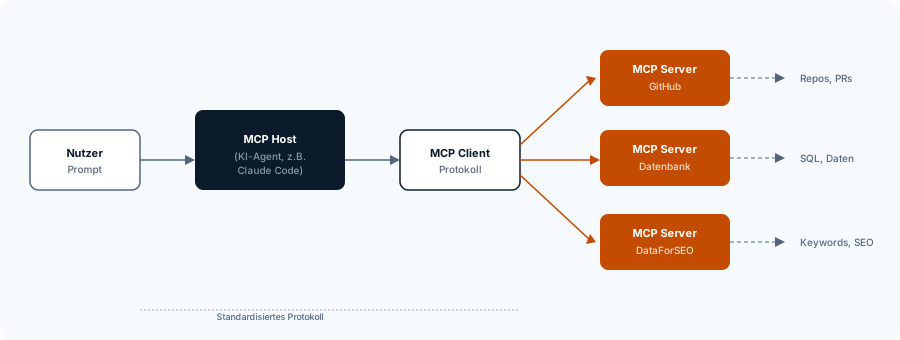
The architecture is straightforward: an MCP Host (the AI application, e.g. Claude Code) connects through an MCP Client to one or more MCP Servers. Each server provides capabilities — database access, GitHub operations, reading Jira tickets, exporting Figma designs.
What this means in practice: I have MCP servers configured in my Claude Code setup for GitHub, Chrome DevTools, and DataForSEO. When I say “research keywords for this blog post,” the agent uses the DataForSEO MCP server to query search volume and keyword difficulty — without me writing a custom API integration.
Another participant boiled it down to one line: “MCP is a standard for tool calls and data exchange between the LLM and the framework around it.” That’s it. Nothing more.
MCP vs. Traditional APIs
Fair question: isn’t MCP just an API with a different name?
Not quite. A REST API has endpoints, parameters, authentication. A human reads the docs and assembles the right call. An MCP server describes its capabilities so the agent can decide which tool to use and when. The agent reads the description and knows what it can do. And because MCP is a standard, one client talks to any number of servers. No custom integration per provider.
When you need MCP: when your agent needs live access to external data — databases, APIs, project management tools, code repositories. When you don’t need MCP: when the information is stable and rarely changes. Then a skill is enough.
Tools — The Agent’s Hands
Tools are the individual functions an agent can call. Each tool does exactly one thing: read a file, write a file, run a shell command, start a web search.
Here’s how the flow works:
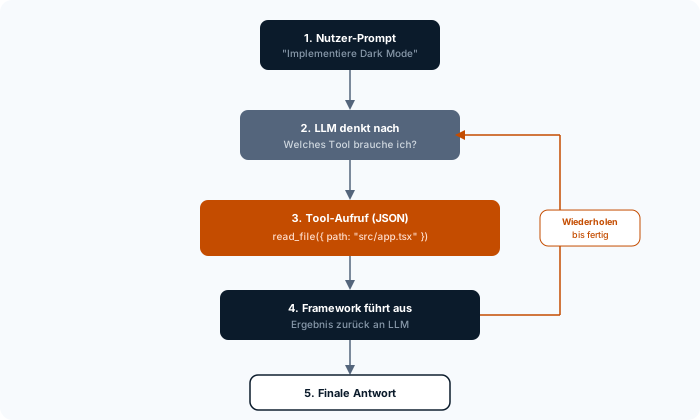
- You give the agent a task
- The model considers what needs to be done
- It generates a tool call request as JSON: “I want to call
read_filewith the pathsrc/app.tsx” - The agent framework executes the call
- The result goes back to the model
- The model decides the next step — or delivers the final answer
A colleague built an open-source coding agent specifically to make this flow transparent. In his code, a tool looks like this: a name (read_file), a description for the model, and an execute function. The model only sees the name and description — and is smart enough to figure out the rest.
That’s the point many people underestimate: “You only type ‘Please implement a dark mode.’ Everything before that — the tool descriptions, the system prompt, the rules — the agent writes invisibly into the prompt.” The user sees only input and output. In between lies the entire architecture.
Skills — Knowledge, Not Connectivity
Skills are the piece most explanations leave out. Which is a shame, because without them the full picture doesn’t click.
A skill is a text file — usually Markdown — that teaches the agent how to approach a specific task. No code, no API connection. Pure knowledge.
From the discussion: “Skills are simple text files. They contain instructions for how the LLM should proceed, which tools to use. Basically an extension to the system prompt.”
Example: I have a skill for code reviews. It says: check type safety first. Look for unhandled edge cases. Flag breaking changes in public APIs. When I activate the skill and say “review this pull request,” the agent knows not just what to check, but how.
MCP vs Tools vs Skills
| Function | What it is | When to use | |
|---|---|---|---|
| Skills | Knowledge | Text file with instructions | When the knowledge rarely changes |
| MCP | Connectivity | Standard protocol to external systems | When you need live data |
| Tools | Action | Individual executable function | Always — agents need tools to act |
And then came the line that stuck with me: “All three end up in the system prompt. All three become text that’s sent with every LLM call.” Skills, tool descriptions, and MCP server definitions — in the end, it’s all text in the model’s context.
How Everything Fits Together
Now for the big picture — the AI agent architecture. MCP, tools, and skills aren’t alternatives. They’re layers that build on each other.
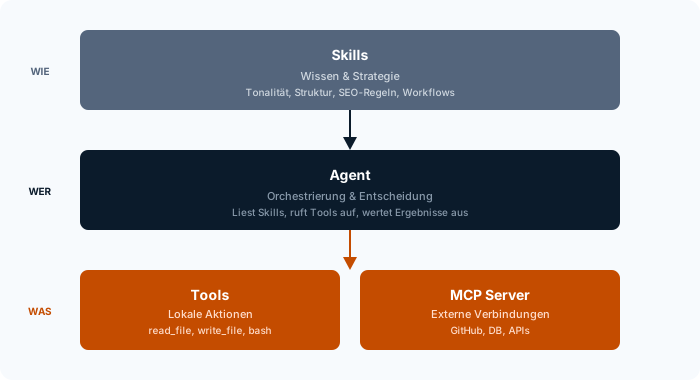
Top: Skills define knowledge and strategy. How should the agent proceed? What tone to hit? What rules to follow?
Middle: The Agent orchestrates. It reads the skills, decides the next step, calls tools, evaluates results.
Bottom: Tools and MCP execute. Tools are local actions (reading files, running code). MCP servers connect to the outside world (GitHub, databases, APIs).
A concrete example from my daily work: I tell Claude Code “review the pull request for the new auth module.”
- A Skill (code-review) gives the agent the review criteria — type safety, security, breaking changes
- The agent uses Tools (
read_file,grep) to read the code and search for patterns - An MCP Server (GitHub) delivers the PR diff and existing comments
- The agent brings it all together
No single part is enough on its own. But together they form agentic AI in practice: a system that actually works.
Why AI Agents Have the Same Problems We Do
The discussion got philosophical toward the end. One participant had fed metacognition concepts to an AI agent — theories about how humans think about their own thinking. What happened next surprised me: the agent independently came up with guardrails for itself. And they were ones we all recognize.
Too much context. Too little caution. Frequent context switches. Getting lost in details and making things worse, instead of stepping back.
His conclusion: “These are all things we humans struggle with too, when problems get too large to solve. The methods for dealing with them are identical.”
When you think about it, this makes sense. AI agents work with limited context. When it fills up, they lose the thread. Just like a developer with 40 open tabs. And the fix is the same: smaller tasks. Clear scope. One thing at a time.
Another developer backed this up from experience: he had drastically reduced his coding agent’s default system prompt. Fewer instructions, less context, less noise. The result: “I see no downsides.”
For teams, this means: a good agent doesn’t need the longest prompt. It needs the clearest one. Same as with human work, honestly. (How I use AI in my daily work as an app developer is a separate post.)
What This Means for Your Team
If you’re considering bringing AI agents into your workflow, here’s the pragmatic sequence:
Step 1: Start with skills. Write down how your team handles specific tasks. Code reviews, deployment checklists, onboarding processes. These are your first skills — text files that an agent can read and follow. No setup needed, no infrastructure.
Step 2: Add MCP when you need live data. Your agent should read Jira tickets? Comment on GitHub PRs? Then you need MCP servers. Most common tools already have official MCP servers. The ecosystem now includes thousands of servers — and growing fast.
Step 3: Build custom tools only when necessary. In most cases, existing tools and MCP servers are enough. Custom tools are worth it only for company-specific systems that no standard MCP server covers.
What I see in practice: most teams over-engineer their agent setup. They want custom MCP servers, custom tools, complex orchestration from day one. But a good skill and the standard tools are enough to start. Add complexity when you know where it’s needed.
If you’re interested in the infrastructure side: in my post on local AI for developers I cover the hardware and cost decisions behind it.
(If you’re thinking about what AI agents could look like in your specific setup — book a free intro call, I’ll give you an assessment.)