App Engagement Strategy: Fixing a 0.6% Push Open Rate
2.7M push notifications, 0.6% open rate at MediaMarktSaturn. The JITAI framework from health research changed how we think about mobile app engagement.
Based on my talk at Flutter Berlin (Flutter OctoberFest). Assumes familiarity with mobile development. No ML or data science background needed.
📺 Watch the full talk on YouTube
TL;DR: Campaign push notifications at MediaMarktSaturn had a 0.6% open rate across 2.7 million sends. The problem wasn’t the content. It was timing, relevance, and volume. We found a framework called Just-In-Time Adaptive Interventions (JITAI), originally from medical health apps, and designed a system that decides whether, when, and what to send each user. The system was still in discovery when I gave this talk, but the thinking behind it applies to any mobile app engagement strategy.
Most mobile app engagement strategies treat push notifications as a broadcast channel: pick a segment, write copy, blast it out, hope for clicks. This post shows what happens when that stops working at scale, and how a research-backed framework gives you a better way to improve app engagement through push notifications. The examples come from a real e-commerce app with millions of users.
The numbers that started the conversation
At MediaMarktSaturn, I worked on the consumer apps team, one of the larger Flutter teams in Germany. We maintained apps across 13 countries. The quarter before, we’d also shipped a push notification service.
Here’s what a bad campaign looked like:
| Metric | Number |
|---|---|
| Push notifications sent | 2,700,000 |
| Opened | ~17,000 (0.6%) |
| Converted (from opens) | 66 (0.36%) |
That’s 66 purchases from 2.7 million interruptions. Not 66 thousand. Sixty-six.
This wasn’t even our worst campaign. But it made the question impossible to dodge: are we providing value to our users, or are we just making noise?
Why push notifications fail to drive app engagement
We kept coming back to four problems:
Timing. Send a notification while someone is in a meeting or on the train and it’s just a disturbance. Every user has different windows of attention throughout the day.
Relevance. A promotion for kitchen appliances is useful to someone furnishing a new apartment. To everyone else, it’s clutter. Batch campaigns don’t distinguish between the two.
Volume. Send too many and users go numb. Or they revoke notification permissions entirely. Once that happens, the channel is dead.
Competition. The average user has around 50 apps installed. Each one wants a slice of a limited attention budget. If your notification doesn’t earn its place, it gets swiped away.
All four come back to the same thing: receptivity, the user’s ability and willingness, right now, to receive and act on an interruption.
What receptivity actually means
Receptivity isn’t a toggle. It shifts throughout the day based on two kinds of signals:
- Internal: mood, cognitive load, what the user is focused on
- External: location, time of day, whether they’re driving, walking, or sitting still
The idea is simple: if someone isn’t in a position to care about your message, sending it does nothing at best and annoys them at worst. Push to a non-receptive user often enough and they’ll opt out.
Our bet: if we time notifications better and make them personal, users will see them as useful instead of annoying. Useful notifications get opened. Opened notifications convert.
What is JITAI? A framework from health research
Just-In-Time Adaptive Interventions (JITAI) comes from medical health research, specifically addiction support and weight loss apps. Those systems monitor a user’s internal and external state and only step in when two conditions are met:
- The user is in a vulnerable state (in a health app: at risk of relapsing; for us: likely to benefit from a product notification)
- The user is in a receptive state (able and willing to process the message right now)
The framework has four parts:
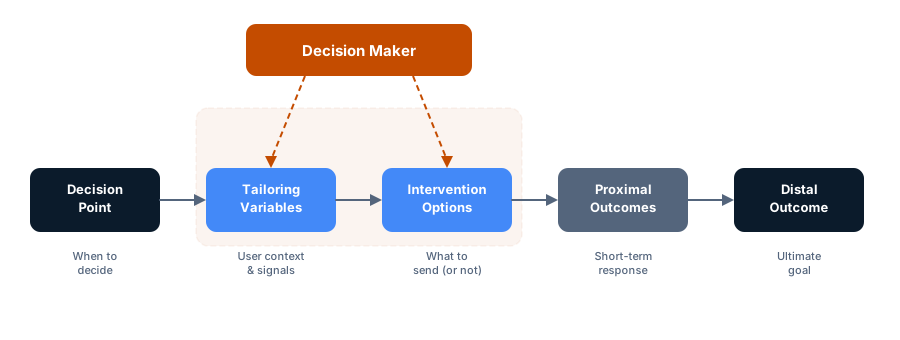
1. Decision points
The moment the system decides whether to show a notification. For server-sent push, this is when the server would normally fire. For on-device local notifications, you can set intervals and check every X minutes whether conditions are right.
The important part: the decision isn’t just “send.” It’s “send, delay, or don’t send at all.”
2. Tailoring variables
The data that feeds the decision. Two sources:
Passive (no user action needed):
- Device type (Android and iOS users often have different notification habits)
- Location (is the user near a physical store?)
- Time patterns (when does this user typically open the app?)
- Sensor data (accelerometer, ambient light, with consent)
Active (user tells us directly):
- Wishlist items
- Search history
- Category preferences
The system has to work with whatever the user consents to share. Someone who only grants location access should still get a noticeably better experience than a batch campaign.
3. Intervention options
What the system can actually do:
| Action | Example |
|---|---|
| Information notification | New arrivals, restocks |
| Promotional notification | Sales, discounts |
| Location-based notification | Store-specific offers when nearby |
| Rich push | Image-heavy, interactive notifications |
| Reschedule | Delay the notification for a better time |
| No push | Suppress the notification entirely |
That last row matters the most. Sometimes the best notification is none.
4. The decision maker
This is the core. It takes the tailoring variables and intervention options and decides which intervention to offer, to whom, and when.
Two approaches:
Algorithmic: Decision trees and rules. Easier to build, test, and explain. Example: if the user is within 500m of a store AND has a wishlist item on sale at that store, send a location-based push.
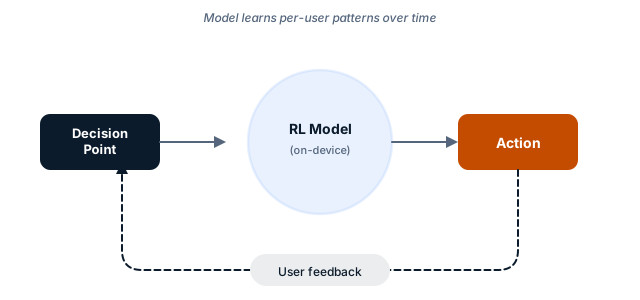
Machine learning: An on-device reinforcement learning model that learns from each user’s interaction patterns. The model improves per-user over time without sharing data across devices. Harder to build and harder to test, but it can pick up patterns that rules miss.
In practice, you’d start with rules and add ML where the rules stop improving.
Push notification examples that improve app engagement
The store walk-by
You’re walking through Alexanderplatz. Your Saturn app knows your wishlist, and you’ve been eyeing a pair of headphones. In the background, the system checks: does the Saturn store at Alexanderplatz have those headphones in stock? Is there a promotion running?
If yes, send a push. You already wanted the product. The store is 200 meters away. The promotion gives you a reason to walk in now.
You find out about a deal on something you already want. The store gets a walk-in. One notification, no spam.
Distal outcome: purchase in store. Proximal outcome: user becomes aware of the deal. Even if they don’t tap the notification, they’ve absorbed the information.
The abandoned cart
You’re at home, browsing the MediaMarkt app. You add three items to your cart. Your partner walks in, you put the phone down, and the cart just sits there.
The system picks up that the cart has been idle for a few hours. One of the items now has a 20% discount that expires soon. You probably forgot about the cart, and you definitely don’t know about the price drop.
Send a notification about the discount. You get a useful reminder. The retailer recovers a sale that would have quietly disappeared.
Both examples follow the same logic: only interrupt someone when you’re reasonably confident the notification is worth their attention.
The hard parts of this engagement strategy
Privacy and GDPR
We’re in Germany. GDPR isn’t a formality, it’s the operating environment. The system touches sensitive data: location, purchase history, browsing behavior. The deal with users has to be clear: this data improves your notification experience, full stop. It’s never sold or shared.
If users don’t trust the system, they won’t grant the permissions it needs. And then there’s nothing to work with.
Testing tailoring variables
Which variables actually predict receptivity? Device type? Time of day? Distance to a store? Some combination? This needs serious A/B testing and careful measurement. The search space is large, and gut feelings about what matters tend to be wrong.
Incomplete data
The system has to work when users only grant some permissions, or none at all. Someone who shares location, wishlist, and browsing history gives the decision maker plenty of signal. Someone who shares nothing gets the batch experience, same as before, no penalties.
That gap in quality is inherent, and it’s fine. But it needs to be measured honestly, not papered over in the dashboard.
Where we left off
When I gave this talk at Flutter Berlin, the system was in the discovery phase. We had research, architecture, and a talk, but no production code yet. The academic literature on JITAI is solid, but applying it to e-commerce push at scale, across 13 countries and millions of users, raises problems the papers don’t address.
The thing I keep coming back to: the problem with push notifications isn’t push notifications. It’s sending the wrong message at the wrong time. And honestly, it’s not having the discipline to send nothing when you don’t have a good reason.
Most mobile app engagement strategies still treat push as a broadcast channel. The bar for standing out is low: just stop yelling at people who didn’t ask.
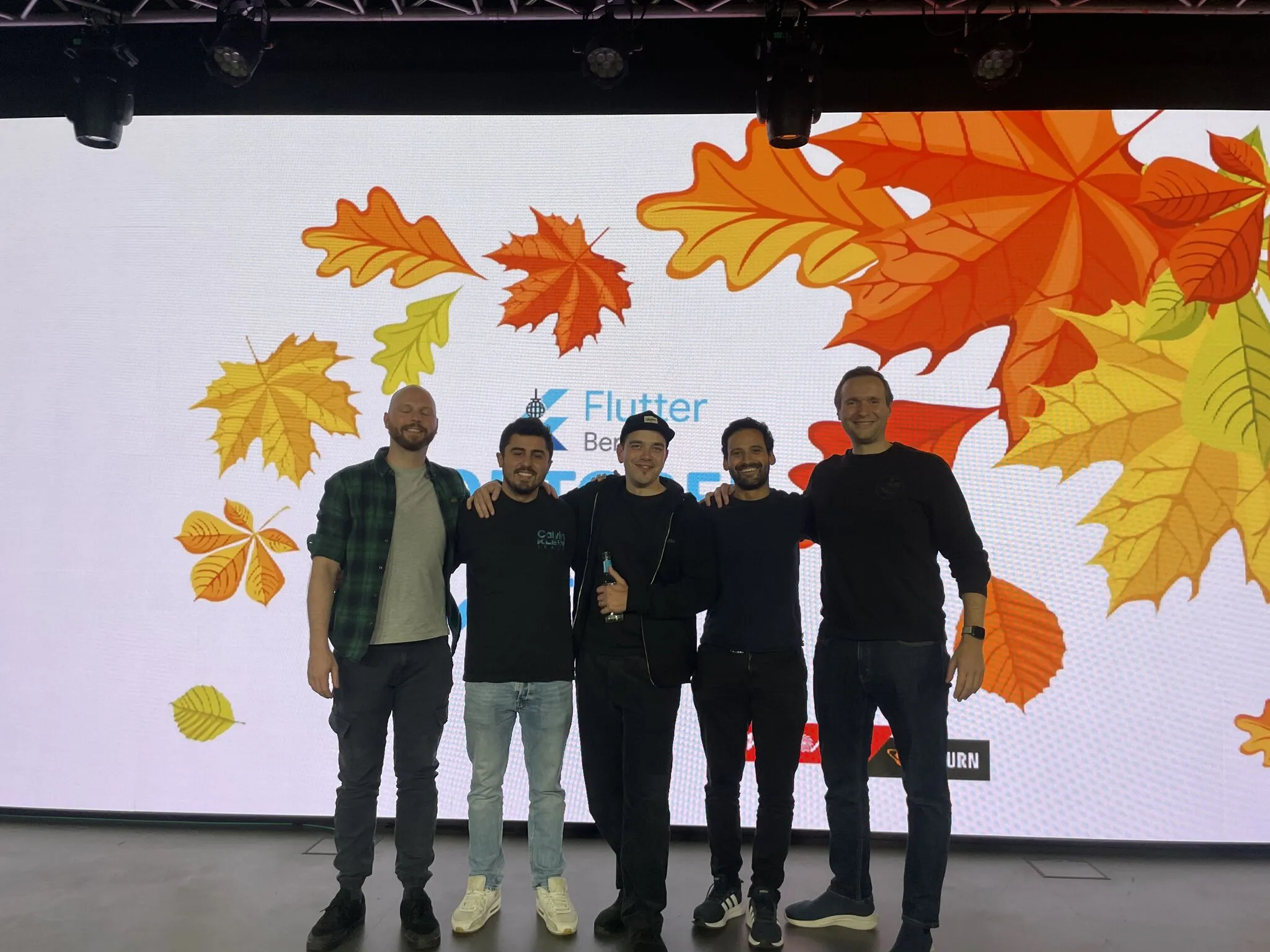
Thanks to Flutter Berlin and MediaMarktSaturn for hosting the event.
If you’re building a mobile app that needs smarter notifications — or rethinking the system you already have — that’s the kind of architecture work I do.
Key takeaways
- Push notification open rates are a symptom, not the disease. The real problem is sending the wrong message at the wrong time to the wrong user.
- The JITAI framework gives structure to personalization. Decision points, tailoring variables, intervention options, and a decision maker — four components that turn “send smarter notifications” into an engineering problem.
- Start with rules, add ML later. Algorithmic decision trees are easier to build, test, and explain. Machine learning picks up patterns rules miss, but only after you understand what “better” looks like.
- The best notification is sometimes no notification. Suppressing a low-value push preserves the user’s trust and keeps the channel alive for when it matters.
Related reading
- Embedding a Website in Your App — Why It Is More Complex Than You Think — the hidden complexity behind WebViews in mobile apps
- WebView App: Payment Flows, State Sync, and Platform Hacks (Part 2) — where WebView integration gets really messy
- Fix: Flutter WebView Tap Gestures Stop Working After Scrolling in NestedScrollView (iOS) — a platform bug we had to solve in production
- The Phoenix Pattern in Flutter: How to Restart Your App Without Restarting Your App — a pattern for forced app restarts without killing the process
- Klaviyo Push Notifications in Flutter: Three Pitfalls Nobody Warns You About — silent delivery drops, tap collisions, and channel importance traps when adding Klaviyo to an existing FCM setup
Further reading
- Nahum-Shani et al. — “Just-in-Time Adaptive Interventions (JITAIs) in Mobile Health” — the foundational JITAI paper
- Hardeman et al. — “Developing and testing a digital intervention for health behavior change” — applying adaptive interventions in practice
- Firebase Cloud Messaging documentation — push notification infrastructure most Flutter apps use
- GDPR and push notifications — EU regulations on user data in notification targeting