Embedding a Website in Your App -- Why It Is More Complex Than You Think
WebViews seem simple -- embed a website, done. In practice, a single line of code hides 1,290+ lines of infrastructure. A real project report.
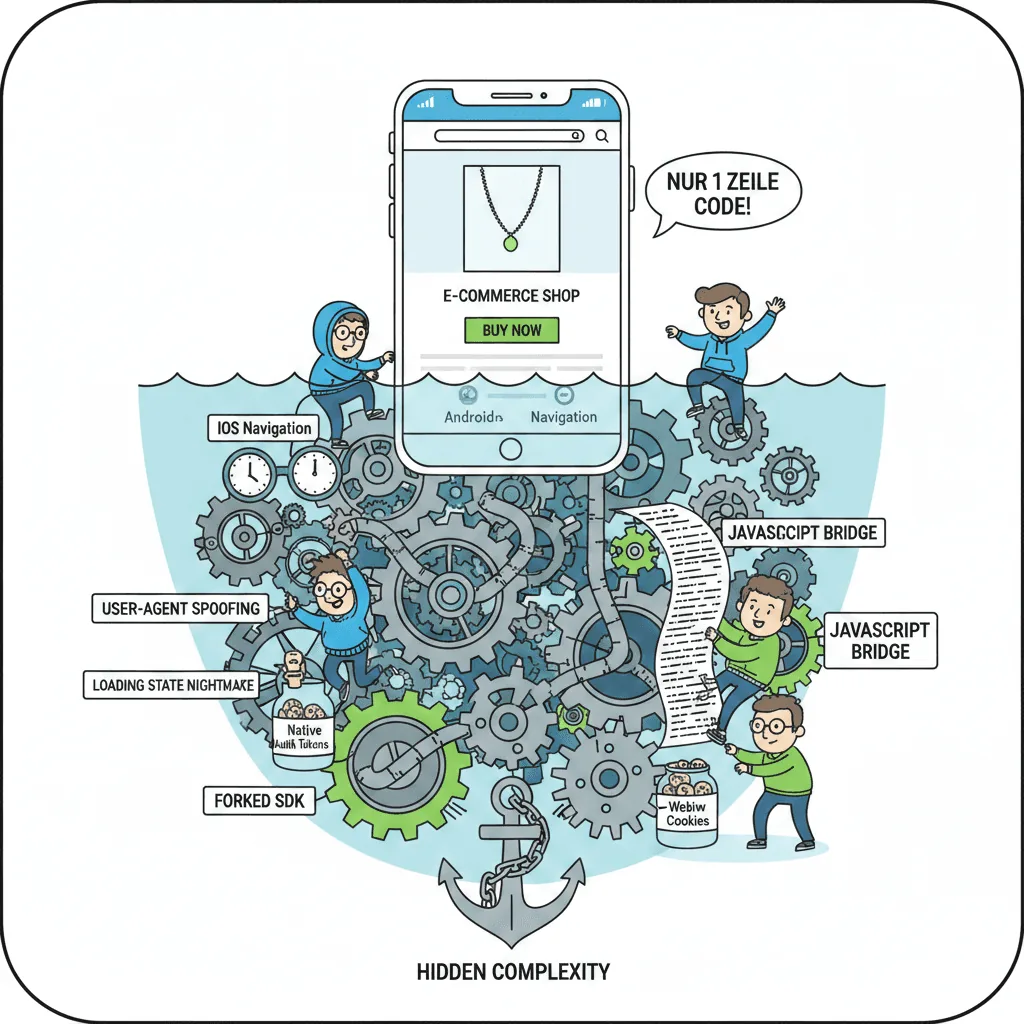
Embedding a Website in Your App — Why It Is More Complex Than You Think
TL;DR: Embedding WebViews in apps seems easy — take an existing website and drop it in. In practice, there is hidden complexity behind it: syncing authentication, managing navigation between web and native, building JavaScript bridges. Using a real e-commerce project with Shopify infrastructure, this article shows where the problems are and when WebViews are the right choice.
What Is a WebView?
A WebView is a browser component embedded directly inside a native app — essentially a browser without the address bar, running within the app itself. On Android, the so-called Chrome WebView (officially “Android System WebView”) is based on the Chromium engine and updated separately through the Play Store. On iOS, WKWebView serves the same role but always uses the Safari engine. The difference from a regular browser: a WebView has no navigation bar, no tab switching, and no URL bar — the app controls what gets loaded and how the user interacts with it.
The Starting Question
“Can’t we just embed our website in the app?”
Every mobile developer hears this at some point. It sounds logical: a working online shop already exists, with curated product pages, a functional checkout, and integrated search. Why rebuild everything natively when embedding would be easier?
The answer: technically possible, but “easy” it is not.
This article walks through a real project — a jewelry e-commerce brand with a Shopify backend — to show what hides behind that single line of code. No theory, just real code examples, real bugs, and real workarounds.
The app is a Flutter implementation with a hybrid strategy: some screens are built natively, others use WebViews. The problems appear exactly at the boundaries between these two worlds.
This is not an argument against WebViews. It is an argument for informed planning.
Hybrid Architecture: What Goes Native, What Goes WebView?
Built natively:
- Authentication (login, registration)
- Onboarding
- Home screen with product highlights
- Account management
- Settings & preferences
WebView:
- Shop browsing (collections, categories)
- Product details
- Cart
- Checkout
- Search
- Order history
Three reasons for this split:
CMS flexibility: Product pages and collections change constantly. The marketing team manages them through Shopify — building them natively would mean manually mirroring every CMS change in the app.
PCI Compliance: Building checkout natively requires your own PCI compliance certification. Hosted solutions like Shopify Checkout handle that for you.
Cost-benefit: Not every screen justifies native implementation.
The shop page looks deceptively simple in code:
WebviewPageWidget(initialUrl: shopConfig.baseUrl);One line. Behind that one line: a 476-line container, five plugins with over 800 lines of code, a JavaScript bridge, cookie management, platform-specific navigation workarounds, and a state machine for the initial page load.
Complexity #1: Auth Sync
The first major challenge in hybrid apps: credentials live in two separate worlds.
Login happens natively. The app communicates directly with the Shopify Storefront API, stores tokens securely via flutter_secure_storage, and manages auth state through a central controller.
Then the user wants to see their cart. The cart is a WebView. The WebView initially knows nothing about the login status.
Tokens to Cookies
Solution: a TokenBag model converts native tokens into WebView-compatible cookies.
class TokenBag {
  final String? cartId;
  final String? shopifyCustomerAccessToken;

  String? get cartToken => cartId?.split('/').last;

  Map<String, String> get cookies {
    return {
      if (cartToken != null) 'cart': cartToken!,
      if (shopifyCustomerAccessToken != null)
        'shopifyCustomerAccessToken': shopifyCustomerAccessToken!,
    };
  }
}
Sounds manageable. But setting these cookies is complex. Every auth state change requires: removing existing session cookies, setting new cookies, and setting additional app-specific cookies.
The Nuclear Option: Destroying the WebView Entirely
Sometimes changing cookies is not enough. The entire WebView has to be destroyed and rebuilt:
final rebuildKey = ValueKey(
  (tokenBag.shopifyCustomerAccessToken ?? 'guest') +
      rebuildIndex.value.toString(),
);

InAppWebView(
  key: rebuildKey,
  // ...
);
Flutter sees the new key, discards the old WebView completely, and creates a new one. Including a fresh page load, a new JavaScript context, new cookie sessions. No graceful transition — a hard reset.
Web-Initiated Native Login
There is also the other direction: the WebView can trigger a native login. When a user clicks “Sign in” during the web checkout, a JavaScript bridge function opens a native login bottom sheet. After native login, the app updates the auth state, refreshes cookies, and the WebView should reflect that.
One git branch is literally called fix/SHOP-74-login-in-cart. Not login in general — login from inside the cart. That is how specific the edge cases get.
Complexity #2: Navigation
The shouldOverrideUrlLoading method in the WebView container spans 100 lines of platform-specific logic. Every line exists for a reason.
State Machine for Initial Requests
enum InitialRequestState {
  none,
  loading,
  loaded,
  cancelled,
}
Why? Because shouldOverrideUrlLoading intercepts every URL request — including the initial one that loads the start page. Without this state machine, the app would block its own initial page load.
iOS vs. Android: Fundamentally Different Event Models
iOS sends NavigationType.BACK_FORWARD for back navigation. Android? Does not fire shouldOverrideUrlLoading during goBack(). Android marks redirects explicitly via an isRedirect flag. iOS does not have this flag.
Every condition in the code exists because a specific bug surfaced on a specific platform. This is not over-engineering — this is damage control.
The restartWebView() Workaround
// TODO(khalit): this feels like a hack. calling restartWebView is needed
// because it prevents shouldOverrideUrl from being called, which would
// cause unexpected behavior.
restartWebView();
await controller.loadUrl(
  urlRequest: URLRequest(url: WebUri(fullUrl)),
);
And back navigation with an artificial delay:
Future.delayed(
  Durations.extralong1, // 700ms
  () async {
    await controller.reload();
  },
);
Waiting 700 milliseconds because an immediate WebView reload would load the previous page instead of the new one. The kind of fix that never shows up in tutorials.
Complexity #3: Five Plugins, Two Worlds, One window.mobileApp
The most elegant — and simultaneously most demanding — solution in the project is the JavaScript bridge. It connects the native app with the website through a plugin system.
The Five Plugins
| Plugin | Lines | Purpose |
|---|---|---|
| ConsentPlugin | 298 | Pass consent data to the WebView |
| TrackingPlugin | 268 | Translate web analytics to Firebase Analytics |
| NavigatePlugin | 127 | Handle web-side navigation |
| LoginPlugin | 68 | Web triggers native login flow |
| UpdateCartPlugin | 55 | Web notifies app about cart changes |
| Total | ~816 | JavaScript bridge infrastructure |
816 lines of plugin code. Plus the 476-line container. For “just embed it.”
The Consent Complexity: Three Approaches at Once
The ConsentPlugin uses three simultaneous approaches to make sure the website recognizes the consent state:
Approach 1: URL parameters — Inject consent data directly into the URL.
Approach 2: JavaScript injection at DOCUMENT_START — Parse URL parameters during page load and set them globally.
Approach 3: evaluateJavascript after load — Send consent data again via JS execution.
Three approaches for one piece of information. Why? Because none of them is reliable enough on its own:
- URL parameters can disappear during client-side redirects
- JavaScript injection fires too early for certain Shopify scripts
evaluateJavascriptfires too late for the initial render
So all three together. Full redundancy.
Complexity #4: Details That Keep You Up at Night
1. User-Agent Spoofing
Shopify returns 403 errors when it detects default WebView user agents. The solution: hardcoded browser user agents per platform.
userAgent: Platform.isIOS
    ? 'Mozilla/5.0 (iPhone; CPU iPhone OS 16_0 like Mac OS X) '
      'AppleWebKit/605.1.15 ...'
    : 'Mozilla/5.0 (Linux; Android 13; Pixel 7) '
      'AppleWebKit/537.36 ...',
Yes, hardcoded strings. Yes, they can go stale. Yes, manual updates are required.
2. Custom WebView SDK Fork
The app uses a custom fork of flutter_inappwebview. Why? The standard version lacks Android Payment Request support — needed for Google Pay in checkout.
That means: maintaining your own fork, watching upstream changes, checking compatibility on every Flutter update. For a single missing feature.
3. Loading State: Render Invisibly, Then Show
// Step 1: Render invisibly
Opacity(opacity: 0, child: webView),

// Step 2: Measure height (after load)
final height = await controller.evaluateJavascript(
  source: 'Math.max(document.body.scrollHeight, '
          'document.documentElement.scrollHeight)',
);
contentHeight.value = height.toDouble();

// Step 3: Show with measured height
SizedBox(height: contentHeight.value, child: webView);
4. The Abandoned Native Approach
Deep in the codebase lies commented-out code:
//   ref
//       .read(shopifyCartControllerProvider.notifier)
//       .addProductToCart(
//         merchandiseId: selectedVariant.id,
//         product: product,
//         variant: selectedVariant.title,
//       );
An attempt at implementing cart functionality natively. Tried and abandoned — because syncing between native cart state and web cart state was too fragile.
When WebViews Are the Right Choice
After all this complexity, it would be unfair to write off WebViews entirely.
1. Product Pages & Collections
CMS-managed content that changes weekly? Definitely WebView. The marketing team maintains it through Shopify, and the app shows it instantly — no app updates needed.
2. Checkout
PCI Compliance, payment provider integration, Shop Pay, Apple Pay, Google Pay, Klarna, PayPal — implementing all of that natively is a project in itself. The hosted Shopify checkout handles everything.
3. Search
Faceted filtering, autocomplete, search suggestions — all Shopify strengths with little to gain from a native rebuild.
4. Legal Pages
Terms of service, privacy policy, legal notice — open in an external browser. No WebView, no custom Chrome.
Practical Decision Matrix
| Criterion | Lean native | Lean WebView |
|---|---|---|
| Auth/Login | Yes | No |
| Payment/Checkout | Only if PCI-compliant | Yes (Hosted Solution) |
| CMS Content | For infrequent updates | For frequent updates |
| Navigation-critical | Yes | Use with caution |
| Performance-critical | Yes | No |
| Offline capability | Yes | No |
Conclusion
“Can’t we just embed the website?”
Yes, but.
WebViews are a tool, not a shortcut. They are appropriate — for CMS content, hosted checkouts, anywhere web infrastructure is better than what native can deliver in the available time.
But they come with their own complexity:
- Credentials need to be synced between separate systems
- Navigation requires platform-specific handling for iOS and Android
- JavaScript bridges need to be built, tested, and maintained
- Edge cases (user agents, SSL, loading states) eat up time
In numbers: this project needed 476 lines for the WebView container, 816 lines for plugin code, and countless bugfix commits — for something that started with “just embed it.”
The right question is not “embed or build native?” but rather: “Which screens native, which WebView, and how do they communicate?”
If you answer that early in the project — and know about the hidden complexity — you will make better architecture decisions and avoid budget surprises.
Frequently Asked Questions
What is a WebView in mobile apps?
A WebView is an embedded browser component in native apps. It renders web content directly — without a separate browser. Users do not see an address bar and ideally do not notice they are looking at websites.
Are WebView apps cheaper than native apps?
Initially, often yes — avoiding native reimplementation of existing websites saves money. Long-term, the hidden complexity (auth sync, navigation workarounds, JavaScript bridges) can eat into that cost advantage. This project has 1,290+ lines just for WebView infrastructure.
Does Apple accept WebView apps in the App Store?
Apple rejects apps that are exclusively WebView-based (Guideline 4.2 — Minimum Functionality). Hybrid apps with native features plus WebViews are accepted — as long as they offer advantages over mobile websites.
When should you build native instead of WebView?
Rule of thumb: go native for (a) auth, (b) offline requirements, (c) performance-critical functionality, (d) complex native gestures and animations. Use WebView for CMS-managed content, hosted checkouts, and frequently updated screens without native performance requirements.